
Thresholds
The thresholds window displays the existing alarm thresholds and allows a user to add or edit threshold levels.
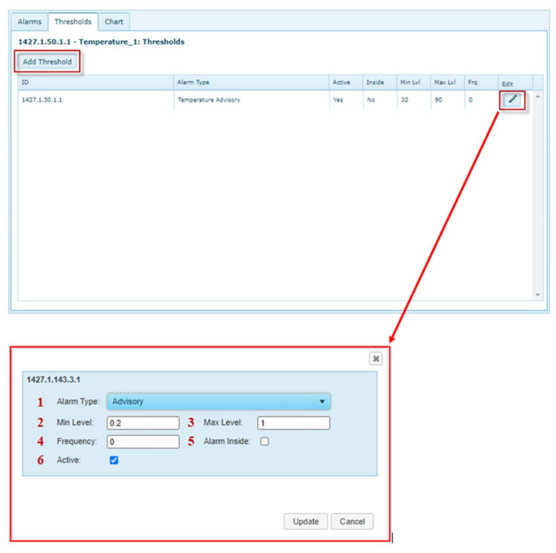
1. Alarm Type: This drop-down box displays a list of all active alarm types. The chosen alarm type will be triggered when incoming values exceed the saved threshold.
2. Min Level: This field is used to set the minimum value of the threshold range.
3. Max Level: This field is used to set the maximum value of the threshold range.
4. Frequency: This field is used to determine how often a given threshold will repeat. A Frequency of 60 minutes indicates that the threshold will not trigger again until a period of 60 minutes has elapsed from the last threshold trigger even if interim values meet the threshold requirements. The Frequency variable is used to limit the number of alarms and reports that are generated by a steady stream of suboptimal data. To enunciate every alarm for a threshold, set the frequency to a value of zero.
5. Alarm Inside: This checkbox is used to toggle between the two threshold types. Checking the box means the alarm condition is triggered when the sensor reading is between the upper and lower threshold. Leaving the box unchecked (default) means the alarm is triggered when the sensor value is outside of the threshold range.
6. Active: This checkbox is used to activate or deactivate a threshold. Deactivated thresholds are not applied to incoming data and do not generate any alarms.