
Manage Training Videos
Merlin Web includes a page used to display training videos. Training videos are flash-based animations used to highlight certain tasks in Merlin. Using the Manage training Videos interface, an Administrator can add videos and filter video access based on the roles assigned to a user using the Credential Manager.
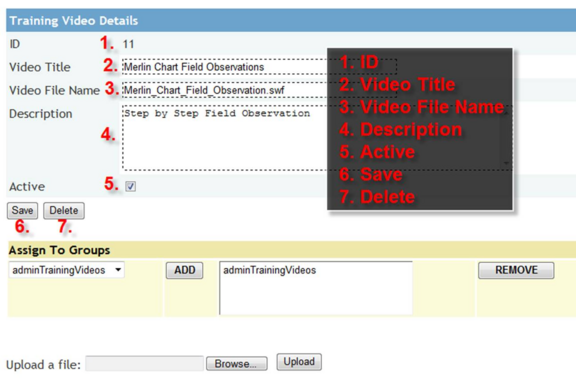
The Manage Training videos contains the following components:
1. ID: This unique identifier is automatically assigned by Merlin Web.
2. Video Title: This field determines the title that will appear in the list of the training videos.
3. Video File name: This field contains the filename of the flash video file. To add a new video file, use the “Upload a File” control at the bottom of the page, then enter the uploaded filename in this field.
4. Description: This field contains a short description of the training video.
5. Active: This checkbox toggles whether a training video is active or inactive. Inactive training videos do not appear in the Training Video list.
6. Save: This button saves changes made to Training Video details or inserts a new Training Video entry.
7. Delete: This button removes a Training video entry. Deleted items can not be recovered.
At the bottom of the form, an interface allows administrators to add Training Videos to a group previously created using the Credential Manager.