
Defining Filter Buttons
Button definitions at the top of the SiteHawk map are determined by the "Button Name" Metadata for individual measurements.
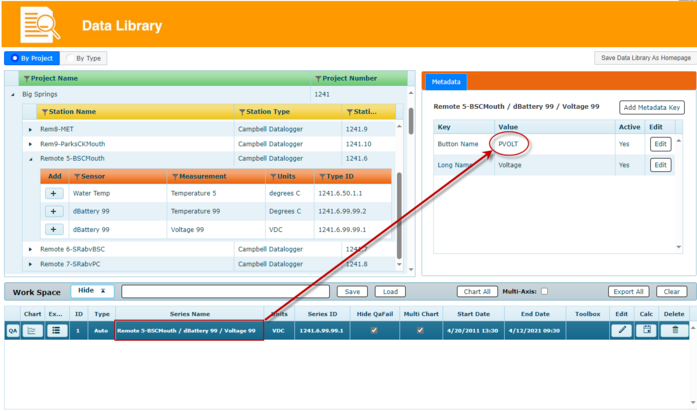
While button names are completely user configurable, certain conventions are generally followed to make them consistent - which also groups like readings together. For example, the string "PVOLT" - meaning Panel Temperature - is generally used to indicate a battery voltage level. The image below shows the Button Name PVOLT for a station battery measurement.
Button names can also he used to distinguish similar measurements at different locations at a site. For example, Total Organic Carbon sensors can be categorized as TOC-I for influent and TOC-E for effluent. Two buttons would be generated on the Sitehawk map: TOC-I would only display Influent TOC sensors, and TOC-E would only display Effluent TOC sensors. A sensor can only be assigned to a single button- i.e. a TOC sensor cannot be assigned to both TOC and TOC-I buttons.
These default Short Name values can be modified by the user in the metadata via Merlin Enterprise or the Data Library. The Short Name is called “Button Name” in the Data Library metadata section.