
Data Library
The Data Library gives a user a convenient space to assemble their own selection of data series for viewing or reporting. It provides a number of fast and easy tools to view, manage, plot and export a single measurement or any combination of measurements. Users can chart, export, annotate, gap-fill and quality control their data all from within this application.
The Workspace allows you to:
· Chart one or more data series (up to a maximum of 15 on separate axis).
· Save a selection of data series in a ‘Template’ for rapid retrieval
· Export data series in crosstab or normalized data format
· Add and view annotations
· Create and modify Metadata
· Apply QA/QC filters
· Assign data quality qualifiers (Good, Poor, Bad, etc.)
· Fill data gaps
· Create uniform time steps.
Below is the image of the Data Library Home page showing the following parts: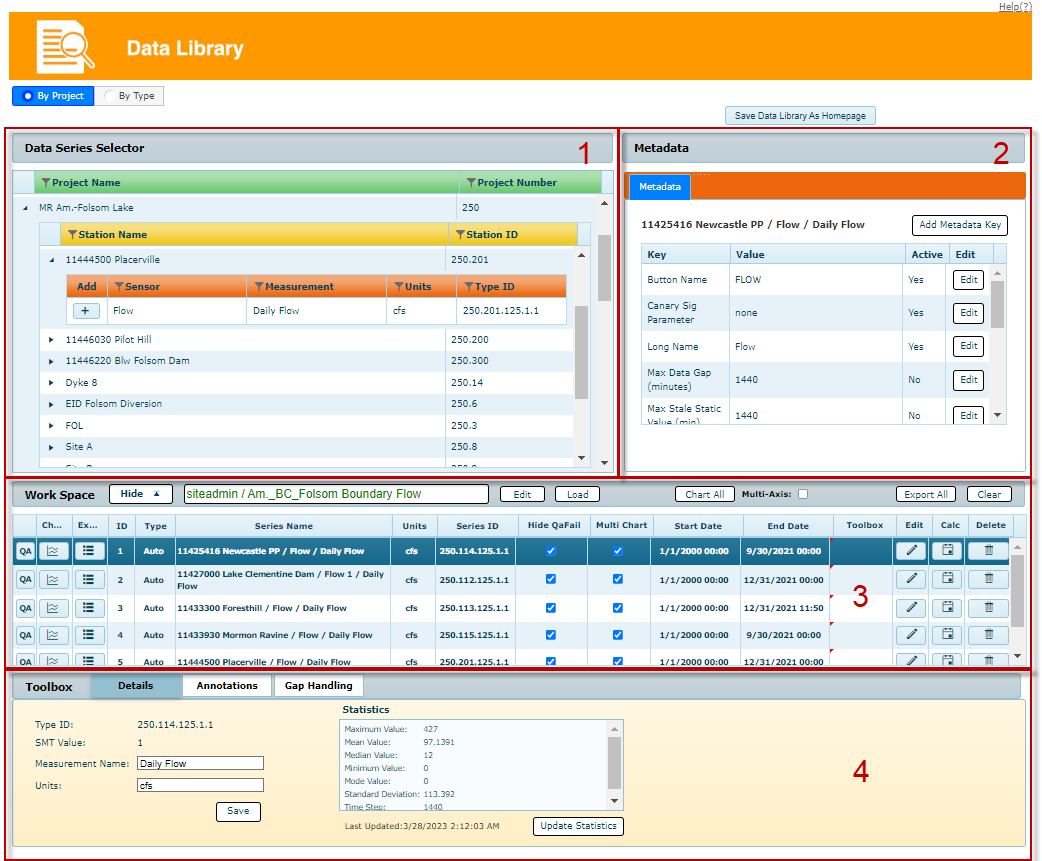
2. Metadata
3. Workspace
4. Toolbox
Each of these parts are discussed in more detail in the following sections.